


Article
Rogue AI Agents and Your Backups: Designing for Assured Recovery
How to protect backup infrastructure from machine-speed attacks with immutable storage, isolated credentials and proven recovery.
Most ransomware intrusions follow a pattern your team already recognises. The tooling is scripted, the operators are people, and the time between first access and encryption gives you a chance to spot them.
AI agents shorten that time. An agent is software that works towards a goal by planning its own steps, running tools and changing approach when something fails. Attackers are now using agents for reconnaissance, credential harvesting and sorting stolen data – work that used to need a team of skilled people.
For anyone responsible for backup, the question that matters is a narrow one. If an intruder working at machine pace reaches your backup infrastructure, will your restore points survive, and can you show that they are clean?
Two kinds of ‘rogue’ agent
The phrase covers two different risks, and both lead to the same place.
- An attacker’s agent, operating inside your network with stolen credentials.
- Your own agent or automation, given wider permissions than it needs and then misdirected – by a faulty instruction, or by an attacker who manipulates what it reads. The NCSC notes that connecting AI systems to company data and infrastructure widens the attack surface.
In both cases a non-human actor holds a valid credential and issues commands faster than anyone can review them. Backup design therefore has to hold when a legitimate administrator account is used with bad intent.

How an AI-driven intrusion goes after your backups
Attackers have targeted backups for years, because an organisation that can restore has little reason to pay. An agent follows the same logic with more patience and more speed. The four stages below each have a practical countermeasure.
1. It reads what you have written down
An agent does not need to scan the network noisily. It can read wikis, scripts, configuration files and shared drives, then work out where the backup server and repositories sit and which accounts manage them.
Countermeasure: assume the location of your backup systems is known, and make sure that knowledge alone is not enough. Keep backup credentials, runbooks and network diagrams out of general file shares and out of scripts. Store them in a separate vault with its own authentication.
2. It reuses credentials until one works
Harvested usernames and passwords are tried across every system the agent can reach. If your backup server is joined to the production Active Directory domain, a compromised domain administrator is also a backup administrator.
Countermeasure: take the backup environment out of the production identity system. Use a separate management domain or local accounts, unique to each component, with multi-factor authentication on every console. A breach of Active Directory should not hand over the backups.
3. It removes your ability to restore
With administrative access, an agent can delete restore points, shorten retention periods or disable jobs through the console or the programming interface (API). It can do this in seconds, long before an alert is read.
Countermeasure: enforce immutability in the storage itself, where the backup software cannot override it. Require a second person to approve destructive changes. Keep a further copy off site under different credentials, so that no single account can reach every copy.
4. It waits, and it takes data
An intruder may be present for weeks before acting. During that time your backups are faithfully capturing a compromised environment. Data is usually copied out before any encryption starts.
Countermeasure: set retention to outlast a realistic period of undetected access, and scan restore points so you can identify the last clean one. Encrypt backup data so the backups cannot themselves be a source of stolen information. Be clear about the limit here: backup restores systems, but it cannot undo data theft. That remains a job for your security controls.
Where conventional backup design falls short
Daily incremental backup’s, a weekly off-site copy and an annual restore test served well for a long time. That design rests on three assumptions which a fast, credentialed intruder undermines.
- ‘An administrator account can be trusted.’ If the account that runs backups can also delete them, a stolen credential ends your recovery options. Deletion needs to be impossible for a set period, whoever asks.
- ‘The most recent restore point is the one to use.’ After weeks of undetected access, the latest copy may contain the intruder’s changes. You need enough history, and enough scanning, to choose a clean point with confidence.
- ‘A yearly test proves we can recover.’ One test a year tells you about one day. Environments change monthly, so verification has to be frequent and largely automated. Designing a backup tier that will defend well
The principles below apply to any modern backup platform. We use Veeam Data Platform as the worked example because many mid-sized UK organisations run it and it is the platform we deploy most often. Each control has limits, and they are stated here because a design that ignores them will fail at the wrong moment.
Immutability enforced below the backup software
A retention setting inside a backup console is only a policy. Immutability means the storage refuses to delete or change data until a set date.
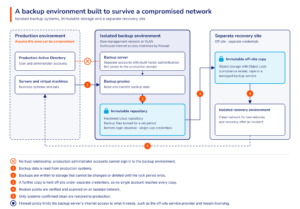
- Hardened repository. Veeam’s hardened repository runs on Linux and marks backup files as immutable for a period you define. It is deployed with single-use credentials that are not stored on the backup server, so a compromised backup server cannot log in and remove the files.
- Limit access. Anyone who gains root access to the repository host itself can remove the immutability flag. The host therefore needs remote login disabled, its hardware management interface isolated, and no membership of the production domain.
- Object storage with Object Lock. In compliance mode, no account can shorten or remove the retention period before it expires. The lock period must be longer than the time you might take to notice an intrusion.
- A copy out of reach. A third copy held off site under separate credentials – tape, or a managed backup service on a provider’s own infrastructure – means no single compromise reaches everything.
A second person for destructive changes
Veeam’s four-eyes authorisation, available since version 12.1, requires a second administrator to approve certain sensitive operations, including the deletion of backups. While it is enabled, delete operations through PowerShell and the REST API are blocked, which matters when the intruder is software issuing API calls.
Three conditions apply. The feature has to be switched on. The two approving accounts must belong to different people with separate authentication. And Veeam’s own documentation states that it cannot protect the backup infrastructure if the backup server itself is compromised – which is why storage-level immutability comes first.
Detection inside the backup
Veeam’s inline scan analyses data blocks during each backup job. It flags a machine as suspicious when the amount of newly encrypted data exceeds a set threshold, or when it finds ransom notes or dark-web addresses. Restore points can also be scanned against antivirus signatures and YARA rules.
This tells you which restore points to distrust. However, it does not detect an intruder who is quietly reading files, it has to be enabled, and it adds processing load to the backup proxies. Treat it as evidence for choosing a restore point, alongside your security monitoring rather than in place of it.
A backup environment that stands apart
Separation limits how far a stolen credential travels.
- Backup servers, proxies and repositories on their own management network, with no direct internet access.
- No trust relationship with the production Active Directory domain.
- Backup software and backup storage on separate systems, so that compromising one does not give control of the other.
- Multi-factor authentication on every console, including the hypervisor that hosts the backup server.
Proving recovery, not assuming it
A protected backup is only half of the requirement. The other half is a restore that works, in a known time, to an environment you trust.
- Verify restore points automatically. Veeam SureBackup starts machines from backup inside an isolated virtual lab and checks that the operating system and applications respond. Run on a schedule, it produces dated evidence that each system can be recovered.
- Scan before you restore. Secure Restore checks a restore point with antivirus or YARA rules before the machine returns to production. If something is found, the restore can be stopped or sent to an isolated network for investigation.
- Rehearse recovery to a clean environment. After a serious intrusion you may not be able to trust your production network. Rehearse restoring core services – identity first, then the systems the business depends on – into a separate recovery environment or disaster recovery environment, such as Covenco’s recovery site in Oxfordshire.
- Measure and record. Compare the recovery time you achieve with the recovery time the business expects. A dated report showing the gap, or the absence of one, is what directors, auditors and insurers will ask for.
Four backup and recovery checks to run this week
None of these needs new budget. Each will tell you something definite about your position.
- Trace the identity path to your backups.
Could a production domain administrator log in to the backup server, the hypervisor that hosts it, or the repository? If so, a compromise of Active Directory is also a compromise of your backups. - Find out where immutability is enforced, and for how long.
Confirm it is applied by the storage – a hardened repository or Object Lock in compliance mode – and not only by a retention setting in the console. Then test it: try to delete a recent restore point with an administrator account. - List every account and API token that can change or delete backups.
Include service accounts and anything used by automation or AI tools. Remove what is not needed and put multi-factor authentication on the rest. - Restore one important system and time it.
Restore into an isolated network, note how long it took and what went wrong, and compare the result with the recovery time the business has been told to expect.
Recovery you can demonstrate
AI agents make intrusions faster and let one attacker pursue more targets. They do not change what a sound backup design looks like: copies that cannot be deleted, an environment that does not share credentials with production, and restores that are tested often enough to be believed.
Covenco is a backup and recovery specialist, not a security vendor. We do not sell endpoint protection or run a security operations centre, and your security team or provider remains the right place for prevention and detection. Our part begins where theirs ends: making sure that when something does get through, your data is intact and your systems come back within the time the business needs.
We have worked in data protection since 1989, hold Veeam Platinum partner status and are certified to ISO 27001. For organisations that want an independent view of their position, we offer a recovery assurance review:
- An assessment of your backup design against the controls in this article – immutability, identity separation, retention and air-gapped immutable storage.
- A witnessed test restore of a system you choose, with the recovery time measured.
- A written report setting out what is protected, what is exposed and what we would change, in order of priority.
You can act on the findings with your own team, or ask us to deliver them through our managed Backup as a Service and Disaster Recovery as a Service.
Complete this form for your recovery assurance review